
User interface that renders chat, responses, and charts. For example, Claude AI web app, Claude Desktop, ChatGPT, OpenAI-based integrations, Gemini-based agents, custom web applications, or internal tools.
ThoughtSpot MCP Server
Table of Contents
ThoughtSpot’s Agentic Model Context Protocol (MCP) Server allows you to integrate ThoughtSpot analytics into any AI-native application, custom chatbot, or LLM platform that supports MCP. Instead of rebuilding analytics logic yourself, you connect an LLM/AI agent to the ThoughtSpot MCP Server.
Overview🔗
ThoughtSpot MCP Server exposes ThoughtSpot analytics as tools and resources that MCP-compatible agents can discover and call.
When integrated, the MCP Server equips your AI agent/LLM with the following capabilities:
-
Automatic discovery of ThoughtSpot MCP tools
-
Natural language queries and responses
-
Programmatic creation of Liveboards and visualizations
-
Generating embeddable visualizations for custom chatbot workflows
Supported use cases🔗
ThoughtSpot supports MCP Server integration for the following use cases:
-
Plug-and-play clients
If your application already has an AI chat interface, you can use the MCP Server to plug ThoughtSpot analytics into your application’s agentic experience. This integration works with agents or LLMs that natively support MCP, such as Claude, OpenAI, Gemini, or custom MCP clients. It allows your AI agent to call tools and leverage ThoughtSpot’s governed analytics, business semantic layer, data context, and row-level/object-level security, so you don’t need to build your own analytics logic. -
Custom chatbot integration
If you are building an MCP-based chatbot or application with your own orchestration logic or LLM, and you want to call ThoughtSpot MCP tools behind a custom web experience, integrate the MCP Server into your application. This approach is recommended when you need fine-grained control over conversation flow, backend orchestration, and the analytics experience.
Choosing the right integration option🔗
Your integration choice depends on where the conversational UI is presented to the user and whether your application relies on ThoughtSpot, a third-party AI agent, or your own agentic AI to orchestrate the analytics workflow.
Regardless of the integration mode, you can leverage ThoughtSpot’s semantic layer, data context, object-level, row-level, and column-level security to ensure trusted, governed analytics for your users.
Architecture and roles🔗
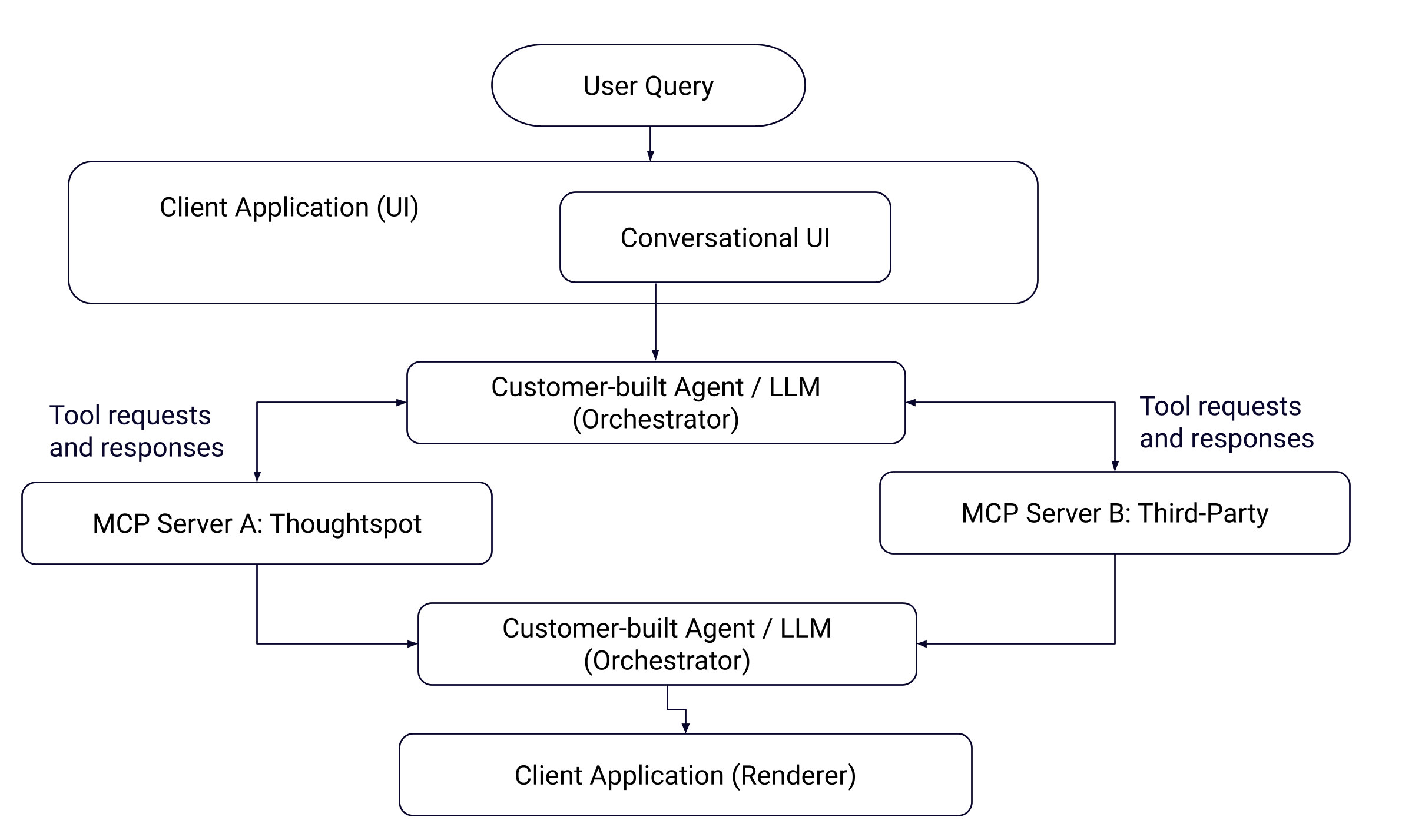
The MCP Server integration and orchestration layer includes the following core components:
| Component | Role |
|---|---|
Client Interface | |
Agent or LLM | Acts as orchestrator.
|
ThoughtSpot MCP Server |
|
ThoughtSpot instance | Your ThoughtSpot instance where data models, Liveboards, and security policies exist. - Executes queries and generates visualizations - Provides access to data - Enforces data security with RLS and CLS rules. |
End user | Interacts with an AI client or custom application, asks questions, and acts on results. |
The following figure illustrates the interaction between the user, agent, and MCP Server:
MCP tools and resources🔗
ThoughtSpot MCP Server exposes the following tools and resources:
-
ping
Connectivity/health check. Used by the MCP host, such as Claude, Gemini, or ChatGPT, to verify whether it can reach the ThoughtSpot MCP Server and whether the server is available. -
getDataSourceSuggestions
Suggests the most relevant ThoughtSpot data sources for a given query. -
getRelevantQuestions
Uses ThoughtSpot’s reasoning engine to turn a broad or high‑level user query into a set of concrete analytical questions that should be asked of the data. -
getAnswer
Executes those analytical questions and returns structured data and answers. -
createLiveboard
Creates a ThoughtSpot Liveboard from a list of answers/questions, typically at the end of a conversation. It turns the conversational analysis into a Liveboard with visualizations.
How it works🔗
The agentic interactions in an orchestrated environment typically include these steps:
-
User asks a question
A user sends a query in the chat interface to get data. For example,What were the total sales of Jackets and Bags in the Northeast last year?.
Optionally, the user can specify the data context to generate a response. -
Agent calls
getDataSourceSuggestions(optional)
If the user’s question doesn’t specify a data source, the agent can callgetDataSourceSuggestions. ThoughtSpot returns candidate data sources (models) with confidence scores and reasoning. -
User’s query is decomposed into sub-questions
To break the user’s query into smaller analytical questions, the agent callsgetRelevantQuestions.
In response to the agent’s request, ThoughtSpot returns the AI-suggested, schema-aware questions that are easier to execute analytically. -
The query is processed for generating answers
For each suggested or chosen question, the agent callsgetAnswer. ThoughtSpot returns the following:-
Preview data for LLM reasoning.
-
Visualization metadata, including an embeddable
frame_url. -
session_identifierandgeneration_numberfor charts that are used as input for creating a Liveboard.
-
-
A Liveboard is generated from the results (optional)
The user can choose to save answers from the conversation in a ThoughtSpot Liveboard. For this workflow, the agent extractsquestion,session_identifier, andgeneration_numberfrom eachgetAnswerresponse and callscreateLiveboard.
ThoughtSpot creates a Liveboard and returns identifiers and aframe_urlfor the Liveboard.During this interaction, users typically see a natural-language summary. When a Liveboard is created, a link to open the corresponding Liveboard in ThoughtSpot is generated.
In custom applications, you can embed the visualizations generated from the interaction, load them inside iframe elements, and render interactive charts directly in your webpage. You can also add your own buttons or links, such as 'Save as Liveboard' or 'Pin this analysis', which call
createLiveboardto create or persist a Liveboard that contains your current charts and analysis.
Getting access to the MCP Server🔗
ThoughtSpot MCP Server is available as an add-on with the following license plans:
-
ThoughtSpot Enterprise Edition
-
ThoughtSpot Embedded
To learn more about subscription options, contact your ThoughtSpot Sales representative.
Next steps🔗
-
To learn how to connect existing MCP-aware tools such as Claude, ChatGPT, and Gemini, see Connecting MCP clients to ThoughtSpot MCP Server.
-
To learn how to integrate MCP Server with a custom chatbot or application, see Integrating MCP Server in a custom chatbot.
Additional resources🔗
-
For information about MCP, see Model Context Protocol specification.
-
For implementation details, see MCP Server GitHub repository.